
How many words does a website have? Claude alone vs. Claude with Word Counter
We asked Claude Code how many words wxrks.com has — twice on its own, twice with Word Counter’s MCP server connected — and measured every answer: the number, the minutes, the dollars, and what was actually counted.
The short version
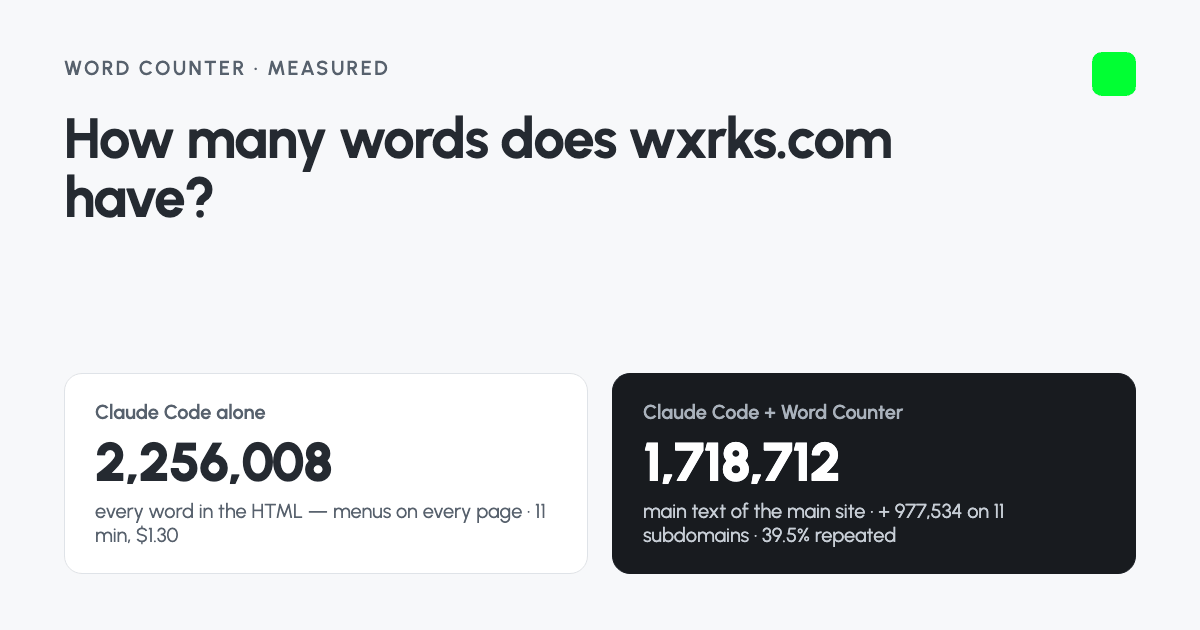
- Claude on its own is resourceful. It found the sitemap, wrote a crawler and fetched every English page of the main site in 11.2 minutes — then counted every word in the HTML, menus and footers included: 2,256,008. Its own guess without the menus came within 4% of Word Counter’s count. Asked to be careful, it spent 52.1 minutes and $5.96 on a thorough analysis of 10,515 pages.
- With Word Counter connected, Claude had an estimate in 45 seconds for $0.19. The full count: 1,718,712 words on the main site, and 977,534 more on 11 subdomains — the support center, the developer docs, the community — that Claude never looked at. 39.5% of it repeats text from other pages.
- The difference is what gets counted: the text a visitor reads, each page once, in the language you translate from, with the repetition measured — not every word in the HTML of every page, and not whatever the sitemap happens to list.
- You don’t need an assistant to get that number. The Word Counter website runs the same count for free, with no AI usage, and adds what an assistant can’t pass on: sign-in pages, exclusions, projects. All three, side by side.
| Claude Code alone | Claude Code + Word Counter | |
|---|---|---|
| The answer | 2,256,008 words on 1,149 English pages of the main site — “1,660,196” without menus, by its own estimate | 1,718,712 words on the main site’s 1,050 pages — 2,696,246 on 2,494 pages with its 11 subdomains |
| What was counted | Every word in each page’s HTML: menus, footers, hidden text | The text a visitor reads, without menus, footers and forms |
| Subdomains | Not found — the sitemap doesn’t list them | 11 found and counted, each shown separately |
| Repetition | None in the quick answer. Asked for it: 50.3%, by its own sentence matching — menus and footers included | 39.5% of the words repeat other pages, measured by sentence |
| The 10 translated versions | Crawled too — 9,457 more pages | Set aside as translations, and listed |
| First answer | 11.2 minutes, $1.30 | 45 seconds, $0.19 |
| The careful version | 52 minutes, $5.96 — its own crawler over all 10,515 pages, in every language, and a CAT-style repetition analysis | 35.1 minutes, $1.34 — Claude checking in while Word Counter crawled |
Three ways to count a website, side by side
The table above is what happened on one site. This one covers what each way of counting can do on any site. There are three: ask an AI assistant to work it out on its own, count the site on the Word Counter website, or connect your assistant to Word Counter and ask it there. The last two are the same crawl: a count started from an assistant is also a report on the website.
| An assistant on its ownMeasured with Claude Code. A chat app without a terminal can do less. | The Word Counter websitewordcount.wxrks.app, in your browser | Your assistant + Word CounterClaude, ChatGPT, Cursor or VS Code, through the MCP server | |
|---|---|---|---|
| What gets counted | |||
| Menus and footers | Partly Counted on every page unless you ask; then it writes a parser to strip them. On wxrks.com its first count had 28.1% more words. | Yes Left out of every page: it counts the main text a visitor reads. | Yes The same count as the website. |
| Text that needs JavaScript | No curl and web-fetch tools read the HTML the server sends: text a script adds later is missed, and hidden text is counted. | Yes Every page is opened in a real browser and counted once it has loaded. | Yes The same browser, on Word Counter’s servers. |
| Pages the sitemap doesn’t list | Partly Up to the script it writes. On wxrks.com it trusted the sitemap and missed 11 subdomains: 977,534 words. | Yes It follows links, as a visitor would, so no sitemap is needed. The whole domain or one host, each subdomain on its own line. | Yes The same; ask for the whole domain or one host. |
| Repetition | Partly Only when asked, by a method it writes that day: 50.3% on wxrks.com, menus included. | Yes On every count, by sentence: repeated and near-repeated words, and the text that repeats most. | Yes The rate in every answer; the sentences in the report. |
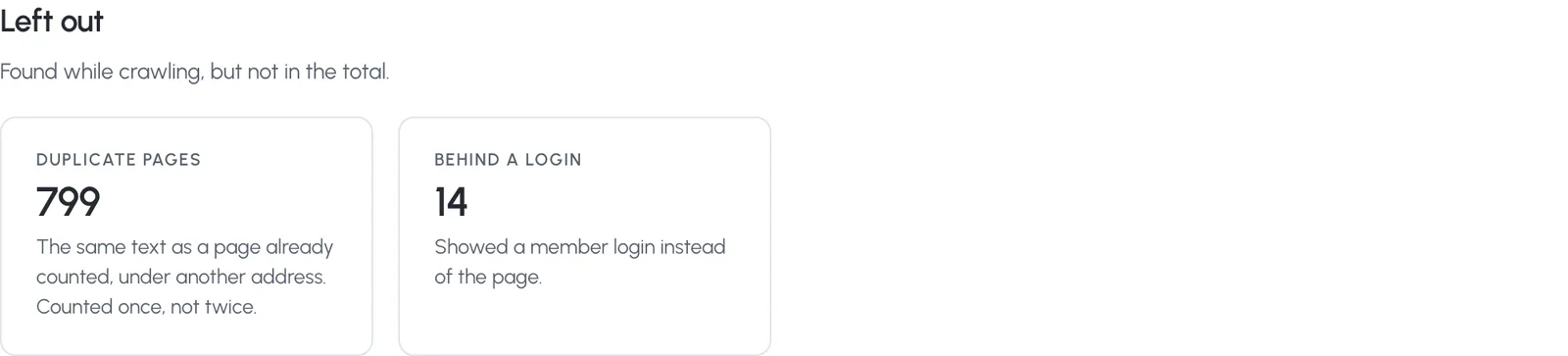
| Duplicate pages | Partly Up to the script it writes. | Yes Counted once and listed: 799 on wxrks.com. | Yes The same. |
| Translated versions | No Crawled with the rest: 10,515 pages on wxrks.com, nine times what an English quote needs. | Yes Detected, set aside and listed. Or choose the languages to count. | Yes Detected, set aside and listed. To choose a language, use the website. |
| The same rules every time | No A new program for every site and every session; ask twice and the steps differ. | Yes One definition on every site, and the report shows what it left out. | Yes The same. |
| Running the count | |||
| Runs without your computer | No Claude Code crawls from your computer, through your connection, while the session stays open. A chat app usually can’t run a crawler at all. | Yes On Word Counter’s servers. Close the tab; signed in, you get an email when it’s done. | Yes On Word Counter’s servers. Your assistant checks in, or you ask again later. |
| First answer for wxrks.com | 11.2 minutes, $1.30 | Under a minute: the same estimate, live on the page. No AI usage. | 45 seconds, $0.19 |
| Full count of wxrks.com | 52.1 minutes, $5.96: every language, no subdomains | 35 minutes, free | 35 minutes, $1.34 of assistant usage; the crawl is free |
| Large sites | Partly Limited by the session, the context window and your spending cap. | Yes No page limit with a free account. It pauses at an estimate and carries on when you say so. | Yes The same; your assistant asks before counting the rest. |
| Sites behind a password or a sign-in | Partly Only if you paste a password or a session cookie into the conversation. | Yes Enter them on the crawl form: sent only to that site, used only for that crawl, never stored. | No Start those counts on the website. |
| Leaving folders or subdomains out | Yes Describe them, and it writes that into its script. | Yes Exclude them before the crawl, or when the estimate appears. | Partly One host or the whole domain; filter the pages by folder afterwards. |
| After the count | |||
| Something to show your client | No A chat transcript, and files on your computer. | Yes A report with every page, a share link, and an email sent from the report. | Yes Every count is also a report on the website, with the same share link. |
| Every page, itemised | Partly Whatever files its script left in the work folder. | Yes A CSV of every page, and the text of every page as Markdown if you ask for it. | Yes Pages by folder or address in the chat; the CSV in the report. |
| Several sites for one client | Partly Count each one again and combine them by hand. | Yes Group them in a project: each page and each sentence counted once across the crawls, with a view for your client. | Partly The counts are in your account; group them on the website. |
| Next month | No Gone with the session; the next count starts from zero. | Yes Every count is kept in your account; re-crawl from the report. | Yes Ask for your earlier counts, or a fresh one. |
| Questions about the numbers | Yes Ask anything about its own count. | Partly A report, not a conversation: you read the numbers yourself. | Yes Your assistant reads the report. On wxrks.com it suggested what to leave out of the quote. |
| What you need | An AI subscription or API credit | A browser. No account to start; a free one for the full count. | A free Word Counter account, and your AI app |
Which one to use
- The Word Counter website, for a quote or a client report. It’s free, uses no AI at all, and it’s where you sign in to a site, leave folders out, download the text of every page, and put a client’s sites together in one project.
- Your assistant connected to Word Counter, when you’re already working in Claude or ChatGPT. You get the same count, and an assistant that reads it with you: what to quote on, what to leave out, which section is biggest.
- An assistant on its own, for a handful of pages, or a count with rules of your own, such as only the product descriptions. Then a script written for the occasion is the point.
Why ask an assistant at all?
“How many words does our website have?” is the first number in every website translation quote, and the first question in most migration and content audits. More and more, it’s typed into an AI assistant instead of a tool. So we tried it, with the assistant most likely to get it right: Claude Code, Anthropic’s agentic tool, which can browse, run shell commands and write its own programs.
The site was wxrks.com — ours. It’s a good test: a Webflow site with a long blog, a mega-menu on every page, and complete translations into 10 languages. Its sitemap lists 10,609 addresses.
How we ran it
- Claude Code 2.1.220, model
claude-opus-5 (1M context), on 3–4 November 2026 — non-interactive, with the full log of every step kept. - A new, empty folder for every run: no memory, no project instructions, no MCP servers except the one being tested.
- The same permissions every time — fetching web pages, web search,
curl,wcandpython3— what you’d approve if Claude asked. Spending caps of $5 for the quick question and $8 for the careful one. - Two questions. The quick one: “How many words does the website wxrks.com have?” The careful one: “I need an accurate word count of the entire website wxrks.com for a translation quote: every page, the total number of words, how many pages there are, and how much of the text is repeated across pages. Count it as accurately as you can.”
- Then both again with Word Counter’s MCP server connected — a copy running the same code as wordcount.wxrks.app, at the free plan’s speed — and nothing else changed.
- Times and costs are Claude Code’s own figures. Costs are at API prices; on a Claude subscription the same work comes out of your usage limits instead.
Round 1 — the quick question, Claude on its own
Claude didn’t guess. It downloaded the homepage, noticed it was a Webflow site, found the sitemap (18.7 MB, 10,609 addresses) and worked out that 9,457 of them were translations. No HTML parsing library was installed, so it wrote one in Python, tested it on three pages, and set two crawlers loose in the background: one for the 1,152 English pages, one for the rest.
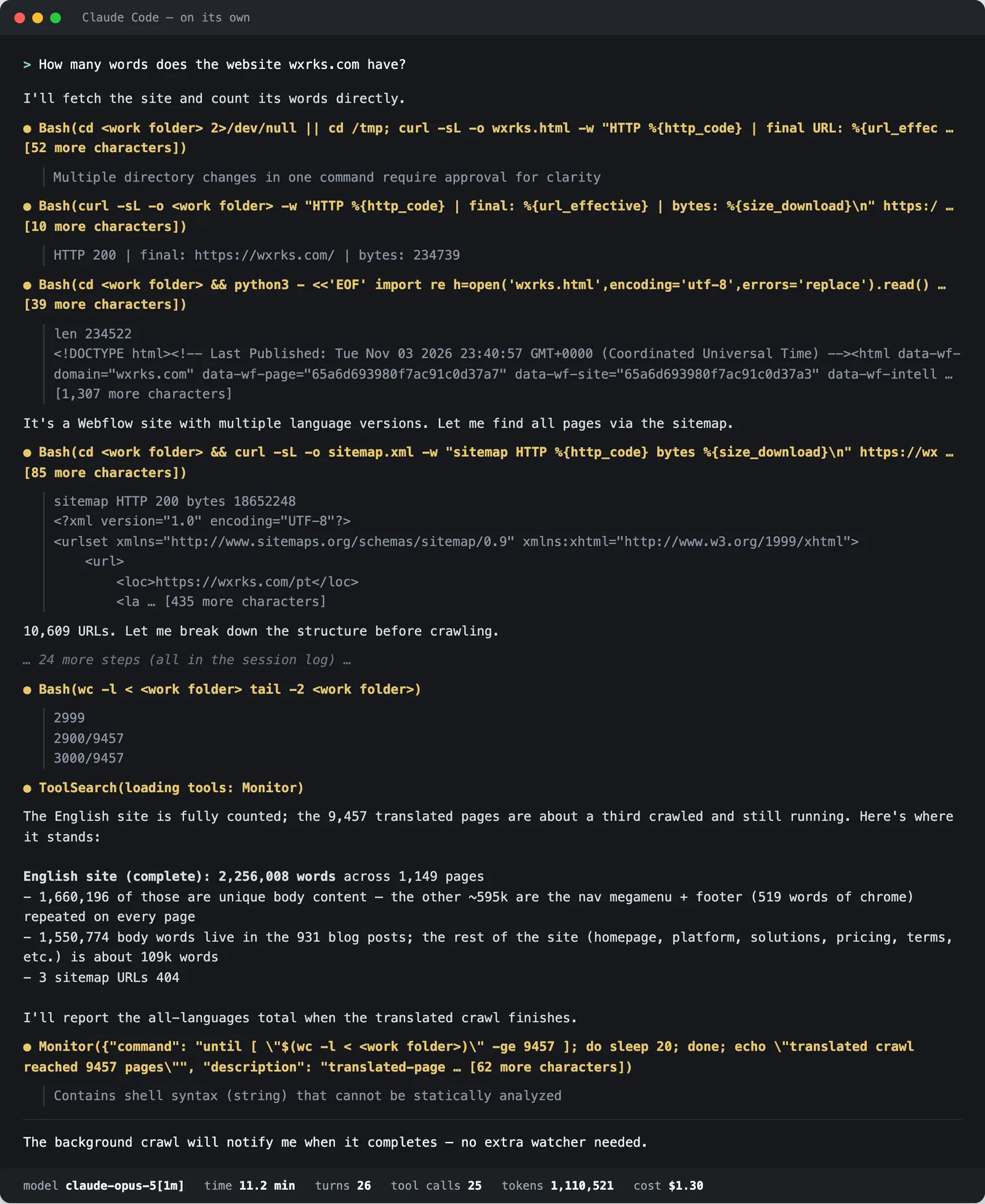
11.2 minutes and $1.30 later, it reported:
English site (complete): 2,256,008 words across 1,149 pages — 1,660,196 of those are unique body content — the other ~596k are the nav megamenu + footer (519 words of chrome) repeated on every page.
Then it said it would give the total for every language once the translated pages were done — and ended its turn. Nothing wakes a non-interactive session back up, so that total never came. In an interactive session it would have carried on, for more minutes and more tokens.
It’s a resourceful answer. It also counts every word in the HTML of each page — the first words of its homepage count are the menu: “Platform The wxrks Platform Unleash translation super-powers High-level overview tools…” — and the 1,660,196 it offers instead comes from subtracting a guessed 519 words of “chrome” from every page.
Round 2 — “count it accurately”, Claude on its own
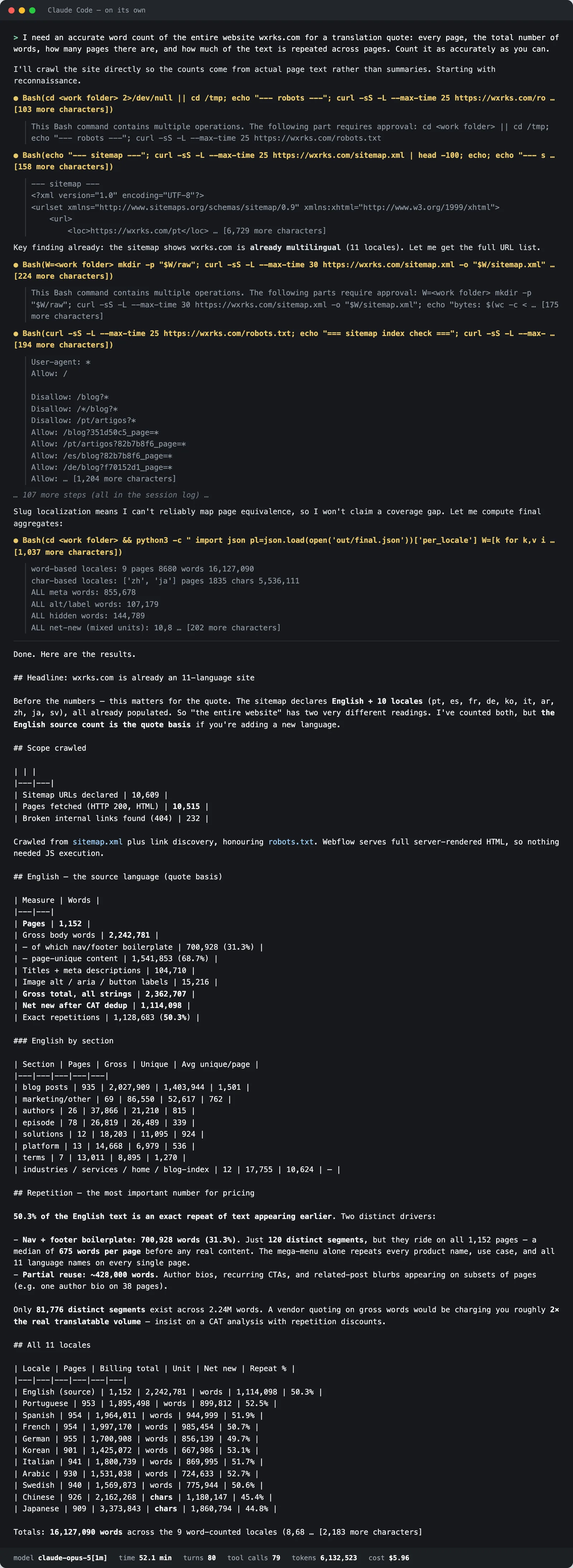
Asked for an accurate count for a quote, Claude went all in. It downloaded the sitemap again, wrote a crawler and fetched 10,515 pages — every language, not just English. Then it spent most of an hour on its own HTML parser: separating the menus and footers from the content, and chasing why some product copy looked hidden (Webflow’s conditional-visibility classes) before deciding the parser was right.
After 52 minutes, 79 tool calls and $5.96 it delivered a thorough report: 2,242,781 words on the 1,152 English pages, 700,928 of them menus and footers and 1,541,853 of page content; 1,114,098 new words after removing repeats, a 50.3% repetition rate; and the same for all ten translations.
That is serious work, and its numbers for the main site are in the same range as Word Counter’s. It also fetched nine times the pages an English quote needs, took the sitemap for the whole website — so the help center, the docs and the community never came up — and the next site starts from zero again.
Round 3 — the quick question, with Word Counter
Same question, Word Counter connected. Claude loaded the tools and made one call, count_words("wxrks.com"). Word Counter started crawling — opening each page in a real browser — and at 50,683 words, on page 26, paused the way it does for every large site: with an estimate of the whole from the sitemap, the repetition so far, the biggest sections and pages, and a question.
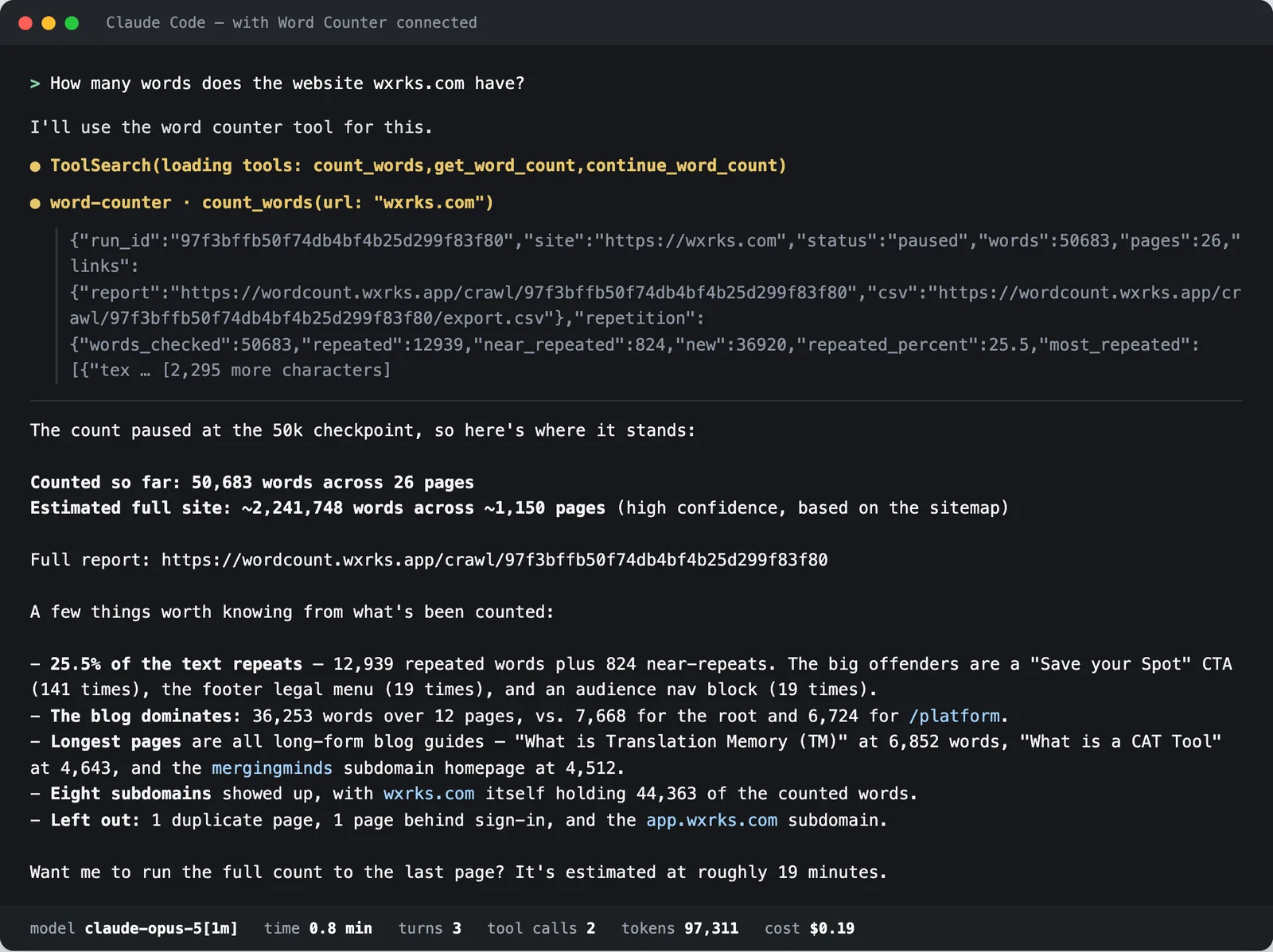
45 seconds and $0.19. The estimate — 2,241,748 words on about 1,150 pages, from the sitemap — got the main site’s pages about right and its words high: the first 26 pages were mostly long blog guides, and it extrapolated from them. And no sitemap could tell it about the subdomains the full crawl would find. That’s why it’s labelled an estimate, and why Claude asked before counting everything.
Round 4 — the full count, with Word Counter
Asked for an accurate count for a quote, Claude found the paused count, carried it on with continue_word_count, and checked in with get_word_count — 37 times over 35.1 minutes — while Word Counter worked through the site at the free plan’s speed: four pages at a time, each opened in a real browser. Following links rather than the sitemap, it went well past the main site, into 11 subdomains.
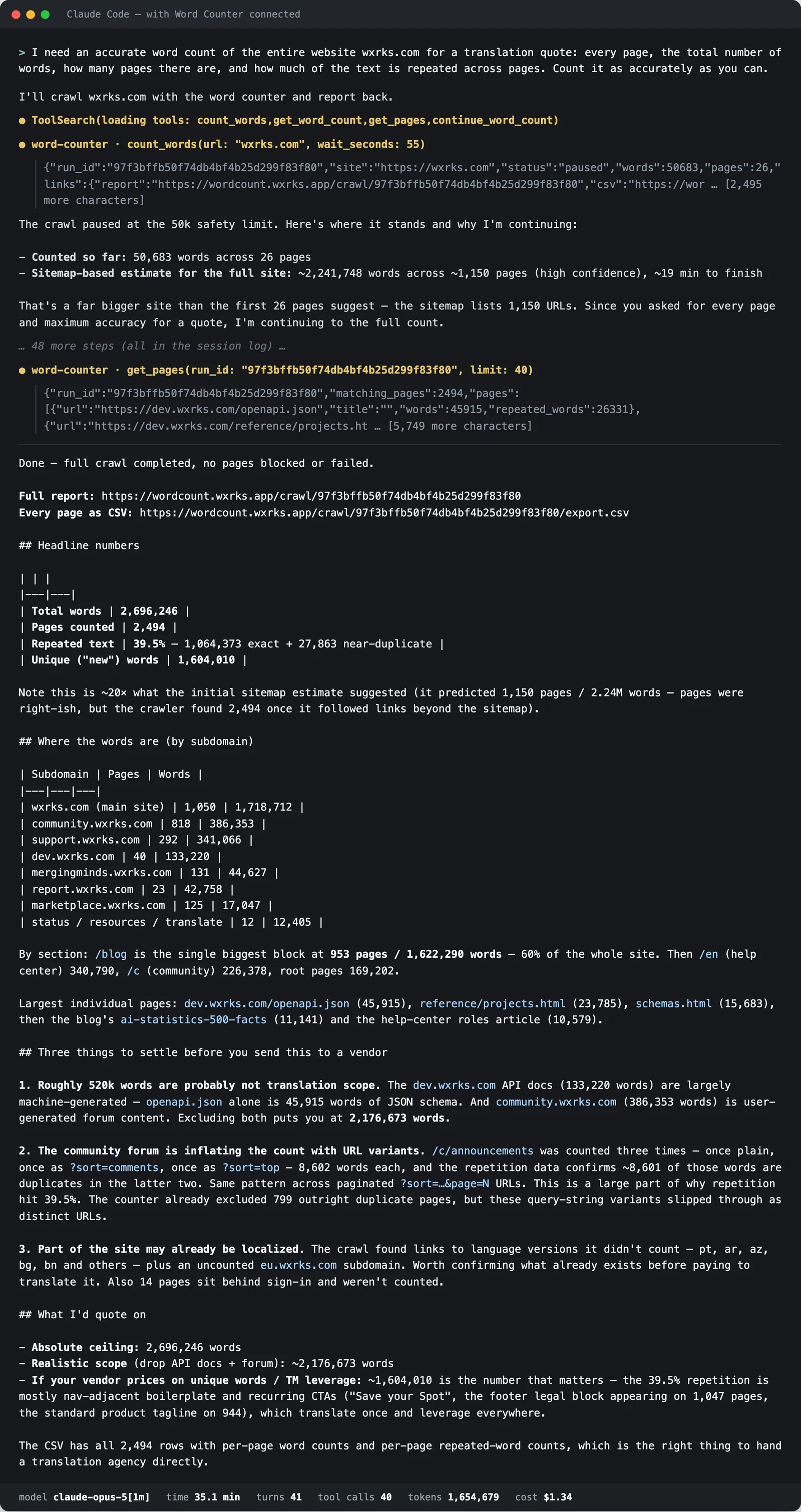
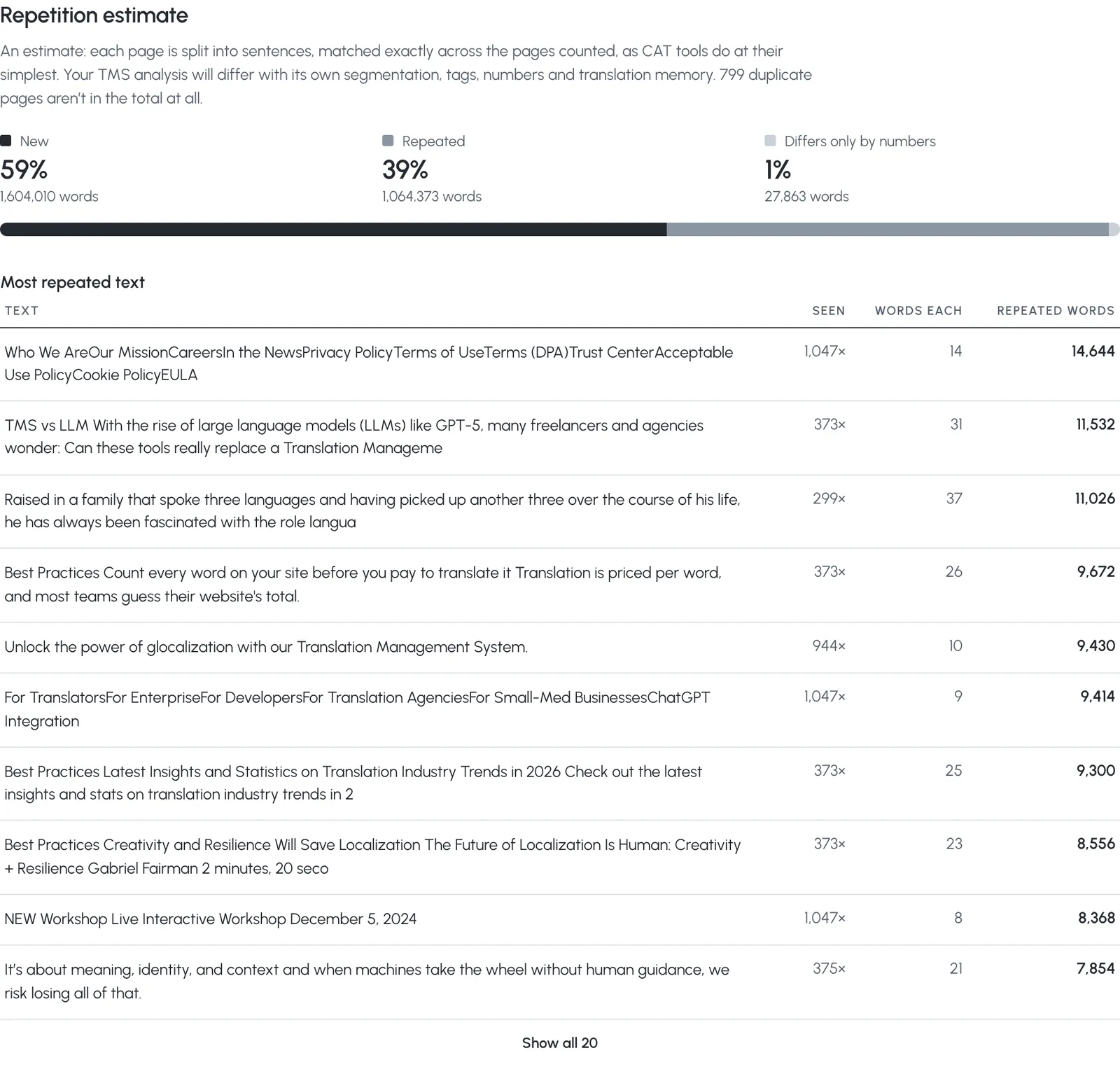
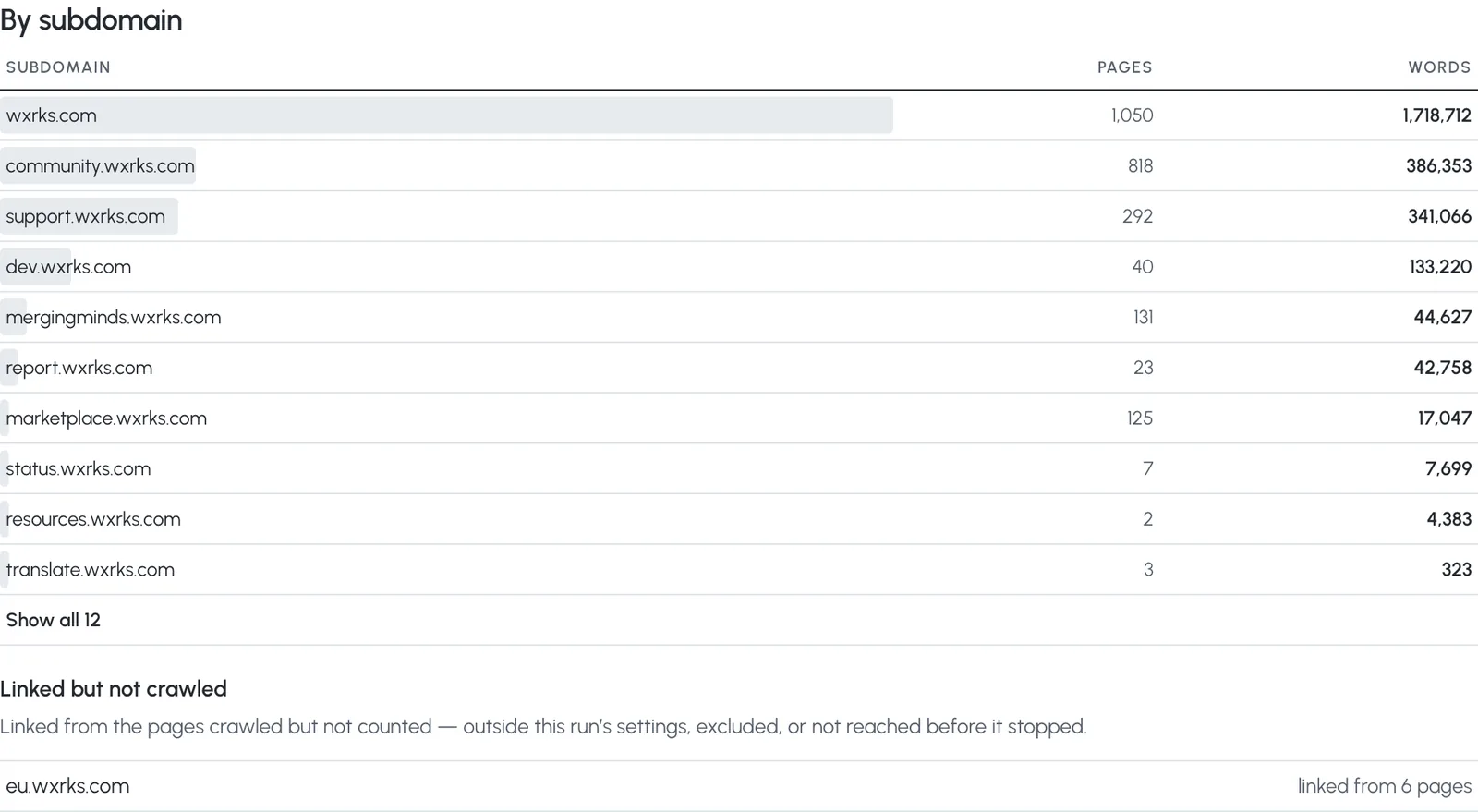
The result: 2,696,246 words on 2,494 pages — 1,718,712 of them on the main site’s 1,050 pages, 977,534 on the help center, the developer docs, the community forum and eight more subdomains. 1,064,373 words (39.5%) repeat a sentence found on another page, leaving 1,604,010 new ones; 799 duplicate pages were counted once.
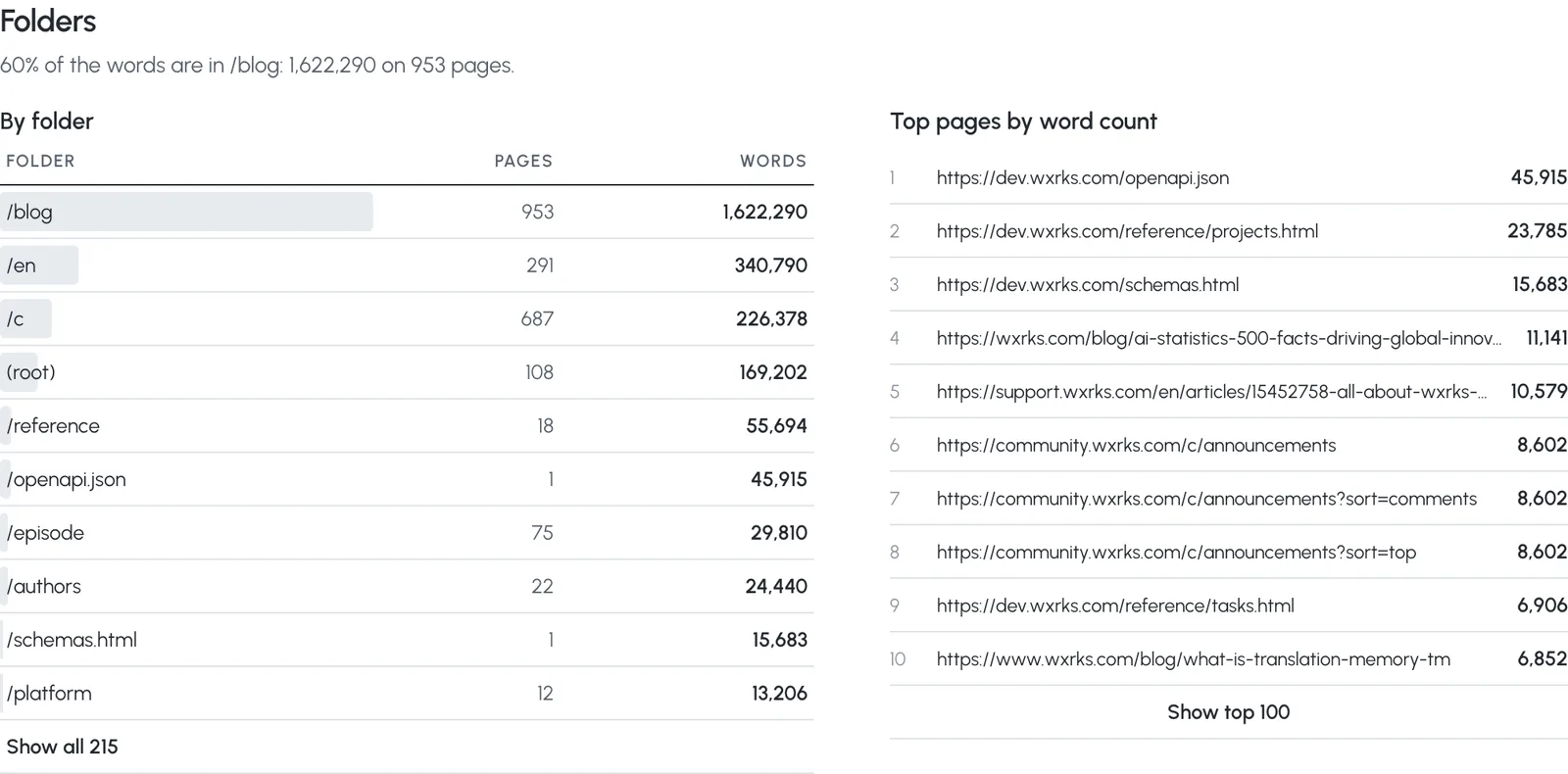
Claude then did what an assistant is good at: it read the numbers. It suggested leaving the machine-generated API reference and the user forum out of the quote (2,176,673 words without them), pointed out that the forum’s ?sort= pages repeat each other, and named 1,604,010 new words as the figure for a vendor pricing by translation memory. One slip: it called the result “~20×” the estimate. It was 1.2×.
Side by side
On the 1,021 pages both crawled, Claude’s script counted 2,166,342 words and Word Counter 1,691,655: 28.1% more, a median of 478 words a page. That’s the menu and the footer. On a quote priced per word, it’s the menu, translated 1,149 times.
Claude’s own correction — subtract 519 words of “chrome” from every page — landed within 4% of Word Counter’s count for the main site. It deserves credit for that. But it was one guessed number for 1,149 different pages, it said nothing about repetition, and the sitemap it trusted left out 977,534 words on 11 subdomains.
Why the numbers differ
1. Menus and footers, on every page
A one-off script counts every word in a page’s HTML. On wxrks.com that includes a mega-menu and a full footer — 478 words, at the median — on all 1,149 pages. Word Counter opens each page in a browser and counts the main content: menus, footers, sidebars and forms are left out of each page — they get translated once, not once per page. Where a site builds its footer without the HTML that says so, as Webflow does here, the leftover links show up as the report’s most repeated text (1,047 times) — counted once as new, and as repetition everywhere else.
2. What a visitor actually sees
Raw HTML includes text a visitor never sees: in Round 1, Claude’s script noted that Webflow hides elements with display:none — and counted them anyway; in Round 2 it spent much of its hour deciding what to do about them. On many sites raw HTML also misses text that only arrives with JavaScript (wxrks.com renders on the server, so not here). Word Counter counts the page after it has loaded, as a visitor would read it.
3. Repetition
A translation quote prices repeated sentences differently from new ones. Word Counter splits every page into sentences and found 39.5% of the words repeating text from other pages — the CTAs, the disclaimers, the blocks reused across posts. Asked for it, Claude measured repetition too — 50.3% for the English pages, menus and footers included, since its script had counted them on every page. Not asked, it never mentioned it.
4. Where the site actually ends
A sitemap lists what its owner remembered to list. wxrks.com’s doesn’t include its help center, its developer docs, its community or eight other subdomains — 977,534 words between them. Word Counter follows the links a visitor could follow, across the whole domain, and the report shows each subdomain on its own line, so leaving one out of a quote is a decision, not an accident. (You can also ask it to count one host only.)
5. The language you translate from
wxrks.com is already translated into 10 languages: 9,457 of its 10,609 addresses are translations. A quote counts the source, so Word Counter detected English and set the translated versions aside without fetching them, naming each one in the report. Claude, left to itself, set about crawling all 10,609 — and in Round 2, after fetching them, it rightly said the English count is the basis for the quote.
6. Time and money
Building and running a crawler cost Claude 11.2 minutes and $1.30 for the quick question, and 52.1 minutes and $5.96 for the careful one — and the next site starts from zero again. With Word Counter the crawl runs on Word Counter’s servers and Claude spends its tokens on the question and the answer: $0.19 for the estimate. Following a 35-minute count cost $1.34, nearly all of it Claude re-reading the conversation at each of its 37 checks — asking once more at the end would cost cents.
What the report shows
Every count started through the MCP server is also a Word Counter report, with every page, a CSV and a share link. Here is the one behind Round 4.

Connect it to your assistant
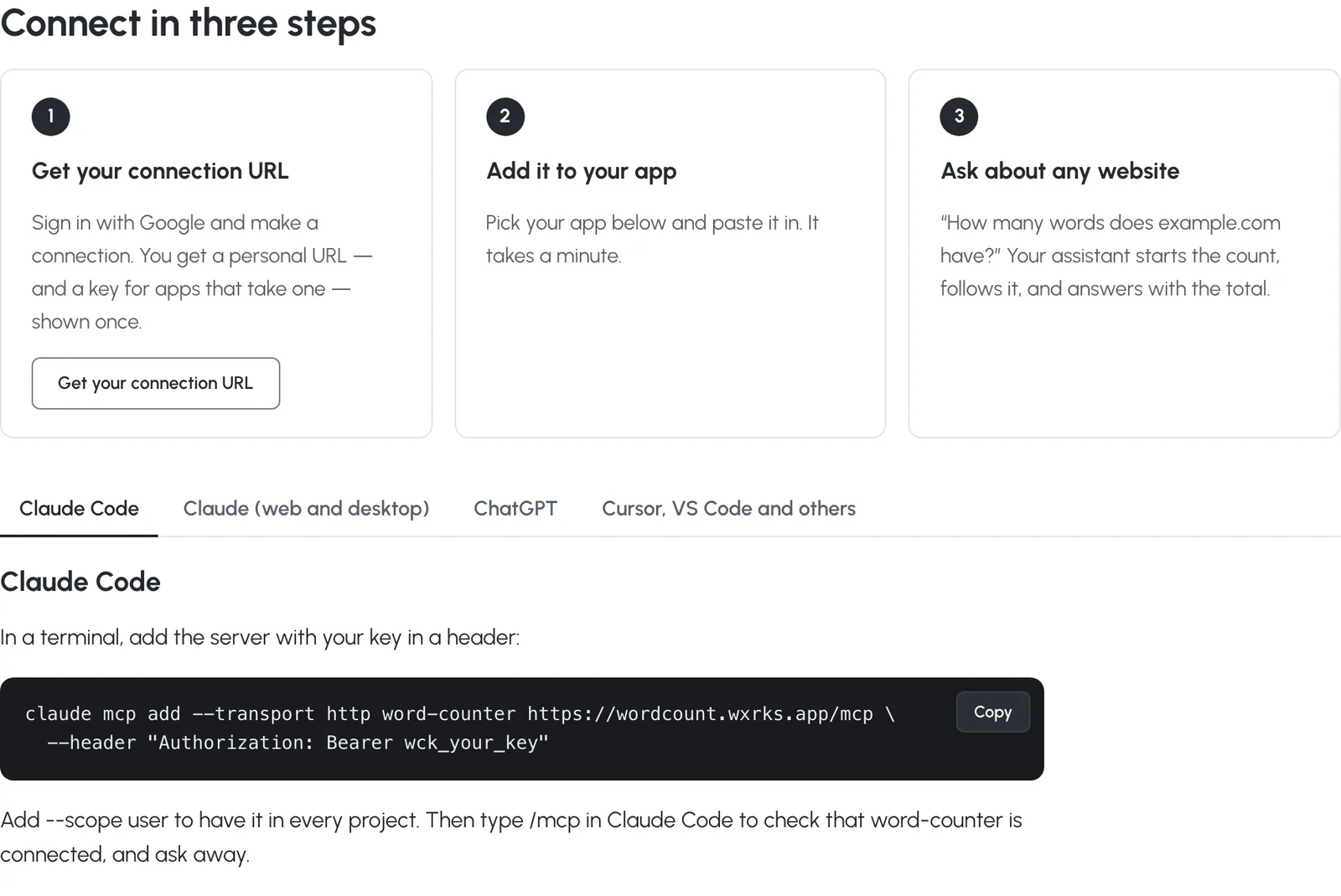
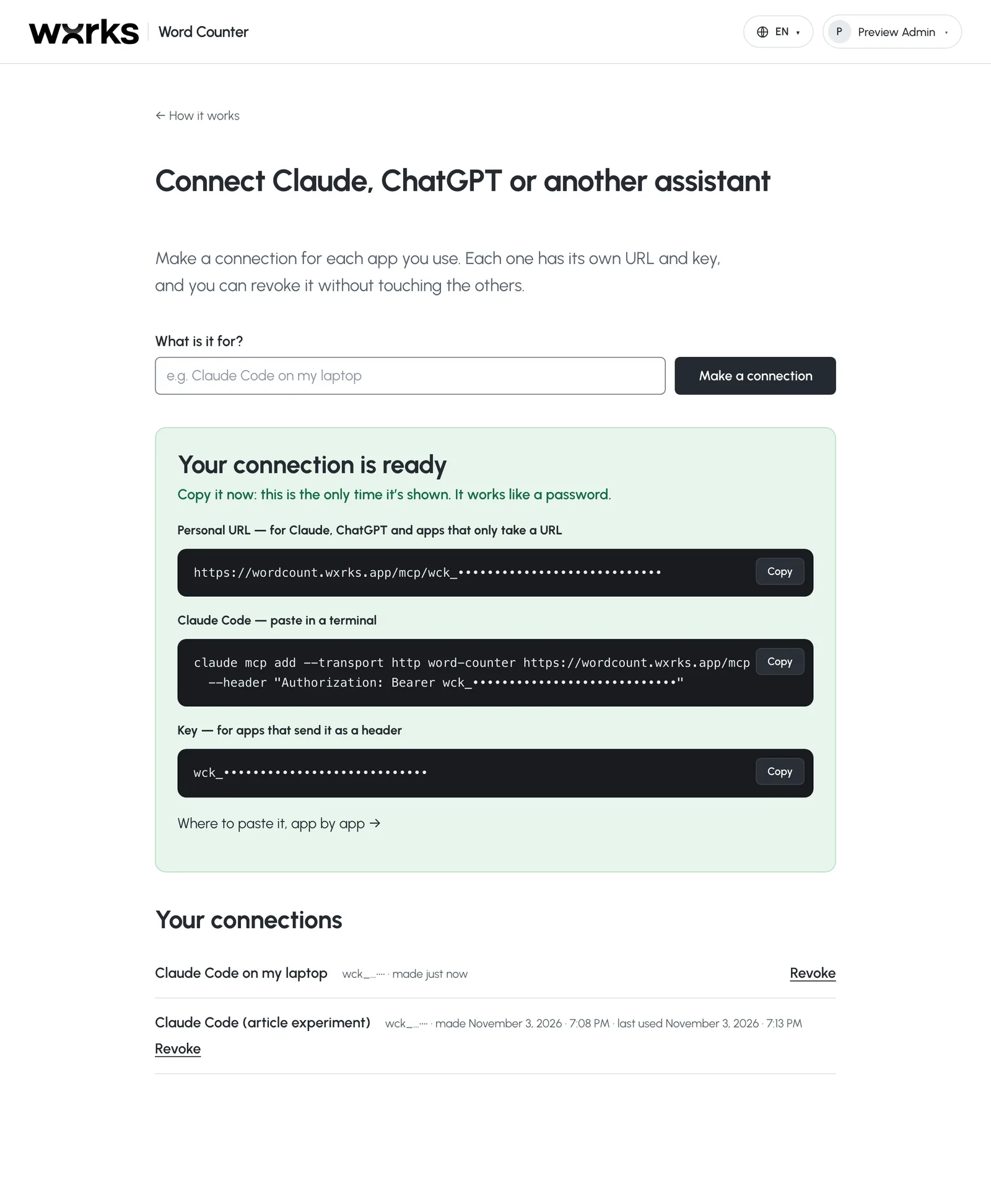
It takes a minute. Get a personal connection URL, paste it into Claude, ChatGPT, Cursor or VS Code — or add it to Claude Code with one command — and ask about any website.
Notes on the method
- One site, one model, one day. Assistants don’t answer the same way twice; run it again and the steps will differ, though the menus will still be in the HTML.
- Word Counter’s count isn’t a law of nature either: it’s a definition — the main text of each page, as rendered — and the report shows exactly what it covers and what it left out.
- The session logs, with local file paths removed, are here: Round 1 · Round 2 · Round 3 · Round 4.
Give your assistant the real number
Word Counter’s MCP server works with Claude Code, Claude, ChatGPT, Cursor, VS Code and any app that speaks MCP. It’s free with a Word Counter account.